Tutorial
From a first line of code to a complete game. Chapter 3 runs your first program, chapter 4 teaches the Lofi language in ten minutes, and chapter 5 builds DUNGEON HUNT, a small arcade dungeon, with the sprite editor, the tile editor and its layers, the screen designer, the tracker and the debugger. It follows the Studio manual, which also holds the reference for every tool.
The finished project ships with Studio in Examples/OS/TUTORIAL and is on GitHub in the DungeonHunt folder.
A second tutorial, GRAVITY, builds a platform game with twelve levels in five worlds, bricks, secrets, drones, a high score, music and a robot that tests it.
3. Your first program
Hello. File > New (Ctrl+N) opens an empty tab. Type:
// hello
print("Hello, Micro-8!");
Press F5. The text appears on the Micro-8 screen. A Lofi program is a list of statements run from the top, there is no
main to write (a function called main is only a habit). Statements end with ; and // starts a comment.
A loop. Replace the program with:
// five lines
for(int i=1;i<=5;i++) print("Line ",i,"␍");
␍ stands for the control character "new line" (code 13) that print obeys. It is not typed from the keyboard: use
Edit > Insert Control Glyph > New line. Studio keeps such characters as pictures so that a file is saved byte for byte.
Something that moves. Sprites are small images the hardware draws for you. This program makes a white square (a sprite image is 24 x 21 pixels of 4 bits, 256 bytes in all) and moves it with the arrows. It needs no file, so you can type it as it is:
// a sprite you move
nat gfxModes=0x2F00;
poke(gfxModes,peek(gfxModes)|0b00000100);       // sprites on
memSet(0x3000+256,252,0x22,0x20);               // image number 1 of the sprite set: all pixels colour 2 (white)
sprPal(0,0);                                    // sprite 0 uses palette A
sprRef(0,1);                                    // and shows image 1
int x=400;
int y=240;
while(_keyDwn!=12) {                             // until ESC
    if((_padLft&0b01000000)!=0) x-=2;            // left
    if((_padLft&0b10000000)!=0) x+=2;            // right
    if((_padLft&0b00010000)!=0) y-=2;            // up
    if((_padLft&0b00100000)!=0) y+=2;            // down
    sprPos(0,x,y);
    vSync();                                     // wait for the screen to be drawn
    sprUpdt();                                   // show the sprites where they now are
}
Run it (F5), click the screen, use the arrows, press Esc to stop. What you just met:
peekandpokeread and write the machine's memory and registers;0x2F00decides which layers are shown._padLftholds the game pad's eight buttons as bits: Right 128, Left 64, Down 32, Up 16, Select 8, Start 4, B 2, A 1. Studio maps the keyboard to the pad (arrows, Z, X, Enter, Tab).sprPosonly notes the position;sprUpdtcopies it to the hardware once the frame is done (vSyncwaits for that moment). Every game loop on the Micro-8 has this shape: read the pad, move things, wait for the frame, show.
Stopping and finding errors. Shift+F5 stops, Ctrl+Shift+F5 restarts. Type prnt("x"); and the line is
underlined at once, the Problems panel says why, and F5 refuses to run until it is fixed: the real machine would
refuse it too.
Saving. Ctrl+S asks for a name on the card: 8 letters at most, then .SRC. Studio keeps the file exactly as typed
(tabs, line endings), so the machine's own editor opens it without surprises.
4. Lofi in ten minutes
Lofi is a small C-like language. Everything here runs in Studio and on the machine. The complete description is chapter 6 of the Micro-8 User's Manual; this is the part you need for chapter 5.
4.1. Variables and types
byte lives=3;            // 0 to 255
nat address=0x1200;      // 0 to 65535, made for addresses
int score=-120;          // -32768 to 32767
real speed=1.5;          // half-precision float: slow and imprecise, keep it for tables
bool alive=true;
text name="BSM";
Integers are 16 bits. int a=200; int b=a*200; does not make 40000: it wraps to -25536 without an error. A product
must stay under 32767, so scale values down (>>7 instead of /128) or keep them small. This is the number one
surprise on this machine and the reason the tutorial game keeps its numbers small.
A value of another type needs a cast: byte b=(byte)(x+3);. The compiler refuses an int where a byte is expected,
which is why the tutorial writes sprPos((byte)(3+i),x,y).
4.2. Operators
int a=7;
int b=a*3+1;             // + - * / %
bool big=(a>5)&&(b!=0);  // == != < > <= >=  and  && || !
int bits=a&0b0101;       // & | ^ ~ on bits (binary and hex literals: 0b0101, 0xFF)
int up=a<<2;             // shifts: by a byte, never by an int
a+=2;                    // also -= *= /= and a++ a--
print(b," ",big," ",bits,"␍");
4.3. Choices and loops
int n=0;
while(n<10) {            // while and for, with break and continue
    n++;
    if(n==3) continue;   // skip the rest of this turn
    if(n>6) break;       // leave the loop
    print(n," ");
}
if(n>6) print("stopped","␍"); else print("never","␍");
4.4. Functions
A function is written once, before the line that calls it (Lofi compiles in one pass). void means it returns nothing.
int square(int v) {
    return v*v;
}
void show(text label,int value) {
    print(label,": ",value,"␍");
}
show("seven squared",square(7));
Functions cannot be nested, but they can call each other and themselves. The call depth is limited to 64.
4.5. Arrays and your own types
int table[5]={10,20,30,40,50};    // a size is a constant; the first index is 0
table[2]=99;                      // there is no bounds check: stay inside
int total=0;
for(int i=0;i<5;i++) total+=table[i];
print(total,"␍");

type pt { int x; int y; };        // a group of values
pt p={4,7};
p.x+=1;
print(p.x,",",p.y,"␍");
Arrays of byte are how a program holds a map, a screen or a file's bytes. The tutorial reads its level into
byte level[379]; and indexes it as level[4+row*25+column].
4.6. Talking to the machine
Almost everything the hardware does is reached by a few calls and a few addresses:
| You want | Use |
|---|---|
| to write text | print(...), curPos(x,y); the text screen is 80 x 40 characters at 0x1200 (glyphs) and 0x1E80 (colours) |
| to read the pad, keys, mouse | _padLft, _padRght, _keyDwn, _mouseX, _mouseY, _mouse |
| to draw sprites | sprRef, sprPos, sprFlip, sprPal, sprPrio, then sprUpdt |
| to test a collision | isSprSpr, isSprBox, isSprPoint, isSprTile, sprOther |
| to show tiles | a map in the tile buffer (areaCpy), the hardware scroll registers 0x2F01, 0x2F02 |
| to switch layers | register 0x2F00 (bit 4 text, 3 tiles, 2 sprites, 0 bitmap) |
| to wait for the next frame | vSync() |
| to play sound | ymVoice and ymNoteOn (six FM voices), synVoice and synNoteOn (the digital synth) |
| to read a file | import(file, address, size) and the fOpen family |
| to keep time | _time (seconds), clkSet() and _mSec (milliseconds) |
The API panel lists every function with its signature, and F1 opens the machine's manual. Studio's completion (Ctrl+Space) and parameter hints show signatures as you type.
Two things worth knowing before the tutorial:
- A hidden sprite sits at (0,0), and all sprites at (0,0) overlap each other: a collision test between two hidden sprites is true. The tutorial game meets this bug and handles it.
printrepaints the colours of the cells it writes (black on transparent by default). To get white text, set the colour buffer after printing, as the tutorial does.
5. Tutorial: DUNGEON HUNT
This chapter builds a complete game from nothing: DUNGEON HUNT, a top-down arcade dungeon in the spirit of the 1980s classics. A horned warrior walks through a dungeon, throws axes in the direction he faces, opens treasure chests, eats apples to stay alive, and must destroy the generators (heaps of bones that send ghosts after him) before they swarm him.
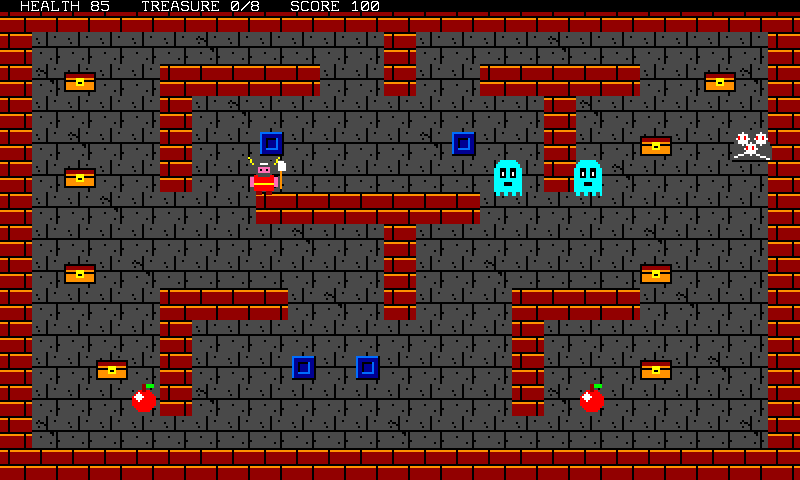
You will use every part of Studio: the project system, the sprite editor, the tile and map editor with its layers, the program editor with its live analysis, the screen designer, the tracker, the debugger, and the transfer to the card. Plan about two hours, less if you open the finished files instead of drawing them.
The rules. Arrows move the warrior, Z (button A) throws an axe, Enter starts, Esc quits. Health starts at 99 and drops by one every second; an apple gives 30 (never more than 99). A ghost that touches the warrior costs him 10 and dies. An axe kills a ghost (10 points), three axes destroy a generator (100 points), and each chest is 50 points. Open the 8 chests to win; reach 0 health and you die.
What the game is made of. One program and six kinds of files, each made with its own editor:
| File | Made with | Holds |
|---|---|---|
HUNT.SRC |
the code editor | the program |
HUNT.SPR (+ .PLA, .PLB) |
sprite editor | 11 sprite images, their collision boxes, the palettes |
HUNT.TLS (+ .PAL) |
tile editor | 4 tiles of 16 x 16 pixels, and their palette |
HUNT.LVL |
tile editor | the 25 x 15 map: a tile number per cell |
HUNT.LAY |
tile editor (layers) | the map's 8 layers: what is solid, where the chests, generators and apples lie |
HUNT.SCR |
screen designer | the title screen |
HUNT.M8S |
tracker | the music |
HUNT.M8P |
Studio | the project: the list of all of the above |
Two ways to follow. You can build the game in your own folder, drawing the assets and typing the code, or read
it in the finished project that ships with Studio: the folder TUTORIAL of the card (File > Project > Open Project...,
TUTORIAL\HUNT.M8P) holds every file, plus three checkpoints, HUNT1.SRC, HUNT2.SRC and HUNT3.SRC, which are the
complete program at the end of steps 4, 5 and 6. If a step does not work, open its checkpoint and compare. The four programs are
played start to finish by an automated test that checks the rules below.
| Step | What you do | Result |
|---|---|---|
| 1 | create the project | an empty program that runs |
| 2 | draw the sprites | HUNT.SPR |
| 3 | build the dungeon and its layers | HUNT.TLS, HUNT.LVL, HUNT.LAY |
| 4 | load the assets, walk, never cross a wall | HUNT1.SRC |
| 5 | chests, apples, health, win and lose | HUNT2.SRC |
| 6 | axes, ghosts, generators | HUNT3.SRC |
| 7 | title screen, music, sounds | HUNT.SRC, HUNT.SCR, HUNT.M8S |
| 8 | debug and measure | what the machine will do with it |
| 9 | check, export, run on the machine | a game on the card |
5.1. Step 1: create the project
A project is one folder of the card holding a program and its assets, described by a small manifest NAME.M8P.
- In the Files panel, right-click the root and choose New folder...; call it
MYHUNT(8 characters at most). File > Project > New Project...: pick that folder, and give the nameHUNT(1 to 8 letters, digits or_).- Studio writes
HUNT.M8PandHUNT.SRCand opens the program:
// HUNT
// Micro-8 Studio project: the assets live next to this file on the SD card.

void main()
{
    print("HUNT␍");
}

main();
Press F5: the screen says HUNT.
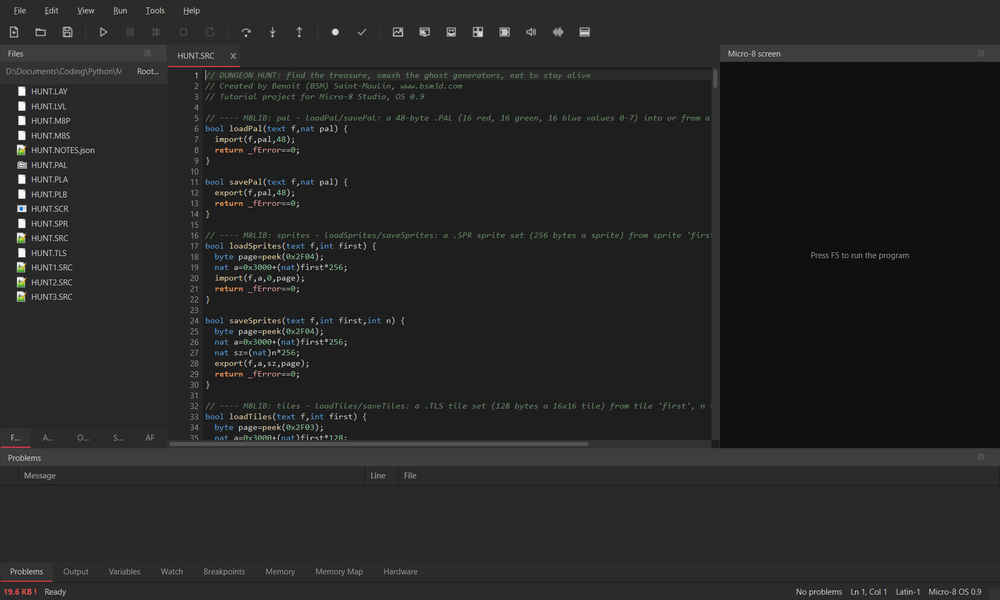
From now on Ctrl+S saves the file, and File > Project > Save Project
(Ctrl+Alt+Shift+S) saves everything that is open plus the manifest. Files you create in the project's folder join the project
by themselves (or use Add Current File to Project).
If you only want to read the finished game, skip the drawing and the typing: open TUTORIAL\HUNT.M8P and go on to step 4.
5.2. Step 2: the sprites
A hardware sprite is an image of 24 x 21 pixels, 4 bits a pixel (16 colours, the first one transparent), and the machine
shows up to 32 of them at once. File > New Asset > New Sprite set opens the sprite editor:
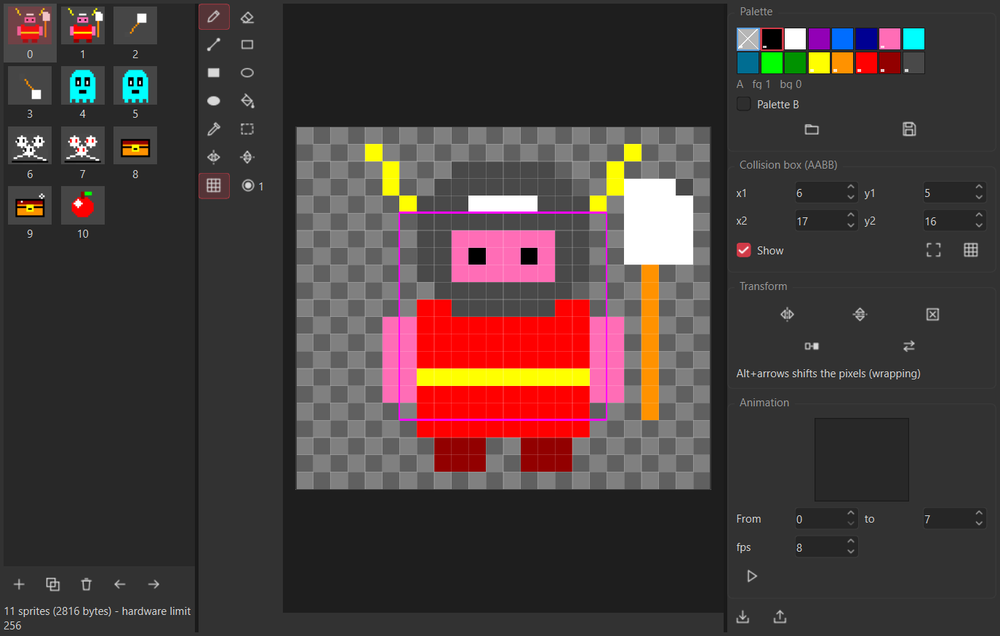
- The list on the left holds the images; + adds one, the others duplicate, delete or move it. The canvas is the
selected image, the palette is above it (index 0 is transparent). Use the pencil, line, rectangle, oval, fill and
eyedropper tools;
Altplus the arrows shifts the pixels; the grid and the onion skin help. - The collision box (the magenta frame, the four fields x1 y1 x2 y2) is the rectangle the hardware uses in
isSprSpr,isSprBoxand friends. It is saved in the last 4 bytes of the image. The fit buttons shrink it to the opaque pixels. - Ctrl+S asks for a name:
HUNT.SPR. Studio also writes the two palettes,HUNT.PLA(palette A) andHUNT.PLB.
Draw these 11 images, in this order, and give each the box below (the numbers are what the program counts on):
| # | Image | Box x1 y1 x2 y2 | Used for |
|---|---|---|---|
| 0, 1 | the warrior, two walking frames | 6 5 17 16 | the player |
| 2, 3 | an axe, two turning frames | 8 6 15 15 | a thrown axe |
| 4, 5 | a ghost, two frames | 6 5 17 16 | the enemies |
| 6, 7 | a pile of bones, eyes dark then glowing | 4 3 19 18 | a ghost generator |
| 8, 9 | a chest, plain then glinting | 6 6 17 15 | the treasure |
| 10 | an apple | 6 6 17 15 | the food |
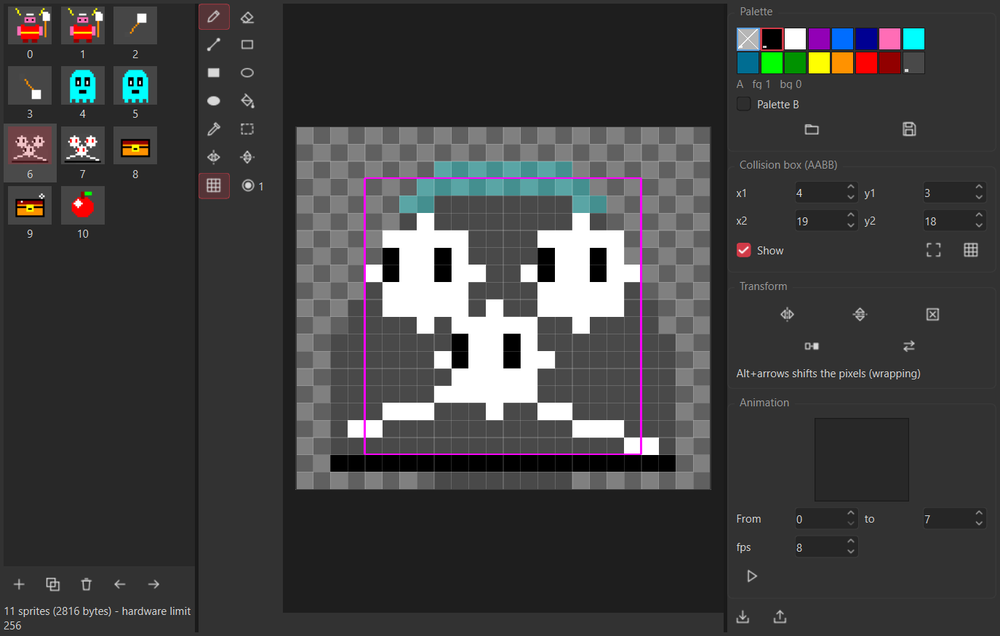
Two habits make the rest of the chapter simple. First, draw every image centred in its 24 x 21 canvas and make its box
centred too (each box above has x1 + x2 = 23 and y1 + y2 = 21): then one formula places every sprite on a map cell.
Second, give the warrior and the ghost the same box; they are then interchangeable in the wall tests.
The palette is the machine's default one (index 1 black, 2 white, 9 bright green, B yellow, C orange, D red, E dark red, F dark grey...),
which is also what every program starts with. The finished project keeps it. The program loads HUNT.PLA and HUNT.PAL anyway, so that changing a colour in an
editor is all it takes to change it in the game.
5.3. Step 3: the dungeon, with its layers
File > New Asset > New Tile map opens the tile and map editor. A tile is 16 x 16 pixels, 4 bits a pixel, and a map is a grid
of tile numbers; the screen shows 25 x 15 tiles.
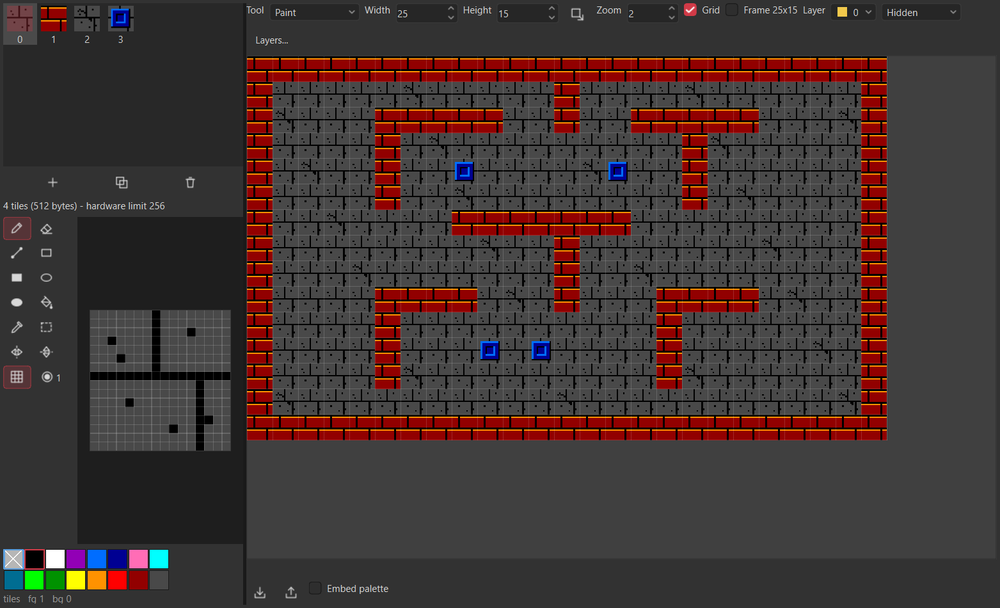
The tiles. Use + to make four tiles and draw them: 0 the stone floor (dark grey with dark joints and specks), 1 the
wall (dark red bricks with black mortar and a lighter edge), 2 the floor with a crack, 3 a pillar (a blue block). The
palette below the canvas is the tiles palette; the default one is fine.
The map. Set the width to 25 and the height to 15 (tick Frame 25x15 to see the screen's edge), pick a tile in the
list and paint with the map tool (left button paints, right button paints tile 0). Here is the plan to copy: # is tile 1, o is tile 3,
and every other cell is floor (tile 0, or tile 2 here and there for the cracks). c, g and f are floor cells that will receive a layer mark in a moment.
#########################
#...........#...........#
#.c..#####..#..#####..c.#
#....#...........#......#
#g...#..o.....o..#..c..g#
#.c..#...........#......#
#.......#######.........#
#...........#...........#
#.c.........#.......c...#
#....####...#...####....#
#....#..........#.......#
#..c.#...o.o....#...c...#
#...f#..........#.f.....#
#.......................#
#########################
The layers. A map can carry 8 layers: eight independent on/off marks per cell, like the machine's own MAPED. The editor does not decide what a layer means: your program does. DUNGEON HUNT uses four:
| Layer | Meaning | Marked cells |
|---|---|---|
| 0 | solid: nothing walks through | the walls and the pillars |
| 1 | a chest lies here | the 8 cells c |
| 2 | a ghost generator stands here | the 2 cells g |
| 3 | an apple lies here | the 2 cells f |
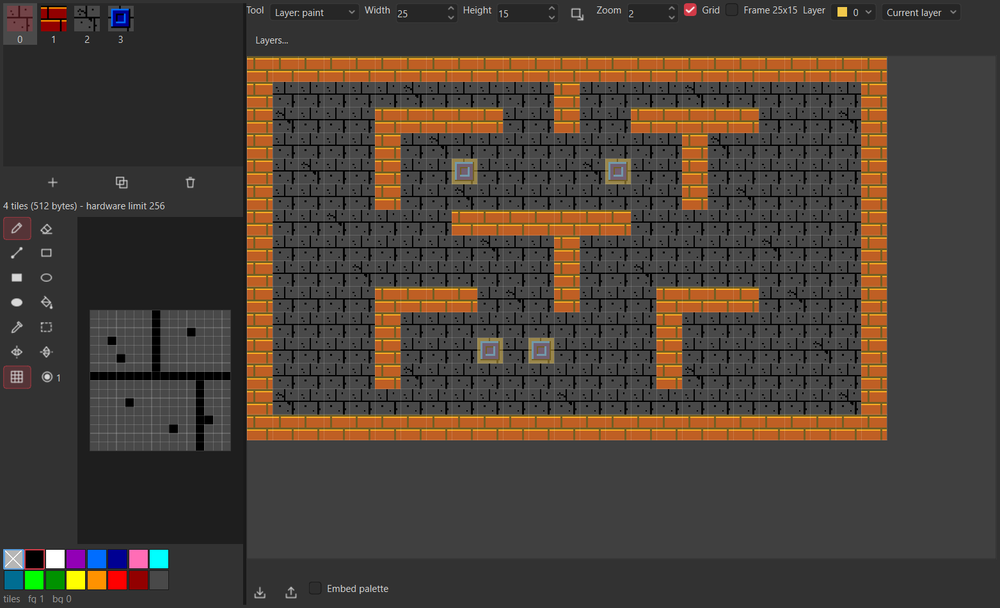
- Choose Layer 0 in the layer list.
Layers... > Generate from the tiles...ticks tiles1and3and marks every cell holding one of them: the whole of layer 0 in one click. - Pick layer 1 and the Layer: paint tool (the tool list); left-click the eight
ccells (right button clears a cell). Do the same for layer 2 (the twogcells) and layer 3 (the twofcells). - The list next to the layer shows Current layer, All layers (a small coloured square per layer in each cell) or Hidden: use All layers to check your work. The layer tools are also erase, fill and rectangle.
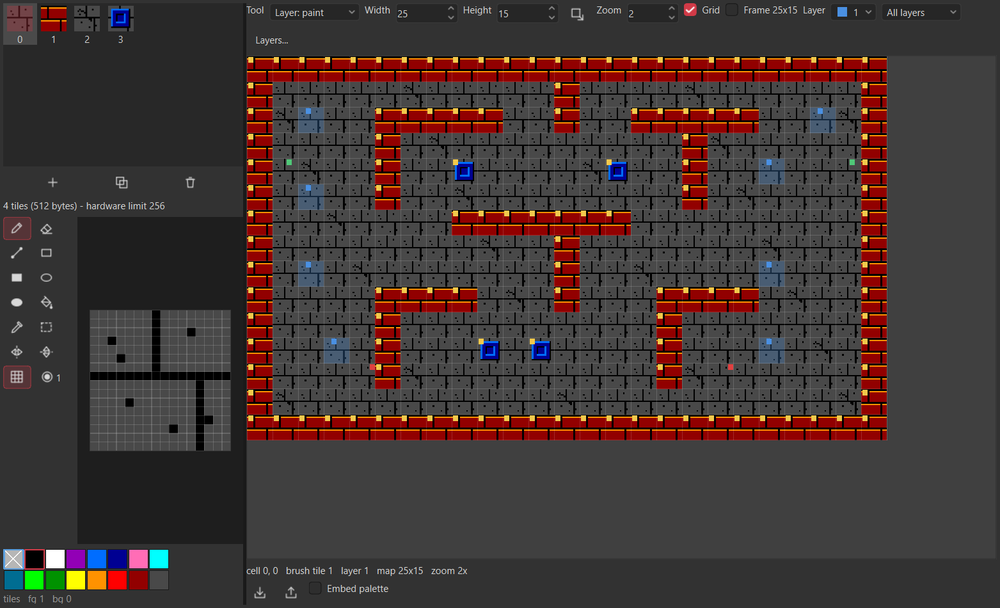
Ctrl+S as HUNT.LVL writes four files: HUNT.LVL (the map: width, height, then one byte a cell), HUNT.TLS (the tiles), HUNT.PAL
(their palette) and HUNT.LAY (the layers: width, height, then one byte a cell, one bit a layer). Layers are saved
next to the map and loaded with it. A program reads them with import, like the map; HUNT.LAY is the same format as the
machine's own MAPED, so a layer file made there opens here and the other way round.
5.4. Step 4: load the assets and walk
Everything the program needs is now on the card. Time to show it. Open HUNT.SRC and choose Edit > Insert Micro-8 Library...: tick pal,
sprites, tiles and level and press OK. Lofi has no #include, so Studio pastes the ready-made functions
loadPal, loadSprites, loadTiles and loadLevel (and only those) after your comments. They return true when a file loaded. Add your
own code after them; here is the whole program of this step, HUNT1.SRC, apart from the library:
// DUNGEON HUNT, step 1: the dungeon and the warrior
// Created by Benoit (BSM) Saint-Moulin, www.bsm3d.com
// Tutorial project for Micro-8 Studio, OS 0.9

byte level[379];                 // HUNT.LVL: 4 header bytes, then 25x15 tile numbers
byte lay[379];                   // HUNT.LAY: the same shape, one bit a layer (bit 0: solid)
int hx;                          // the hero's sprite position, in 800x480 pixels
int hy;
bool faceLeft;
byte frame;

// is the point (sx,sy) of the screen inside a solid cell?
bool solidAt(int sx,int sy) {
    if(sx<0||sy<0||sx>=800||sy>=480) return true;
    int cell=(sy/32)*25+(sx/32);
    return (lay[4+cell]&1)!=0;
}

// would the hero's box (24x24, at 12,10 inside the sprite) touch a solid cell if the sprite was at px,py?
bool blocked(int px,int py) {
    int x0=px-48+12;
    int y0=py-42+10;
    return solidAt(x0,y0)||solidAt(x0+23,y0)||solidAt(x0,y0+23)||solidAt(x0+23,y0+23);
}

void setup() {
    memSet(0x1200,3200,' ');                       // an empty text screen, white letters, no background
    memSet(0x1E80,3200,0x02);
    poke(0x2F00,0b00011100);                       // text, tiles and sprites on, bitmap off
    loadPal("HUNT.PAL",0x1170);                    // tiles palette
    loadPal("HUNT.PLA",0x11D0);                    // sprites palette A
    loadTiles("HUNT.TLS",0);
    loadSprites("HUNT.SPR",0);
    loadLevel("HUNT.LVL",&level,379);
    loadLevel("HUNT.LAY",&lay,379);
    areaCpy(&level+4,25,0,0,25,15,0x2B00,32,0,0);  // the map into the tile buffer the screen shows
    for(int i=0;i<32;i++) {
        sprPal((byte)i,0);
        sprPrio((byte)i,0);
        sprPos((byte)i,0,0);                       // hidden
    }
    hx=72;                                         // cell (1,1)
    hy=68;
}

void moveHero() {
    byte pad=_padLft;
    int dx=0;
    int dy=0;
    if((pad&0b01000000)!=0) dx=-3;
    if((pad&0b10000000)!=0) dx=3;
    if((pad&0b00010000)!=0) dy=-3;
    if((pad&0b00100000)!=0) dy=3;
    if(dx!=0&&!blocked(hx+dx,hy)) hx+=dx;
    if(dy!=0&&!blocked(hx,hy+dy)) hy+=dy;
    if(dx<0) faceLeft=true;
    if(dx>0) faceLeft=false;
    if(dx!=0||dy!=0) sprRef(0,(byte)((frame>>2)&1));  // walk: the two hero frames
    sprFlip(0,faceLeft,false);
    sprPos(0,hx,hy);
}

setup();
while(_keyDwn!=12) {                             // until ESC
    moveHero();
    vSync();
    sprUpdt();
    frame++;
}
Press F5, click the screen, and walk with the arrows. The warrior stops at every wall.
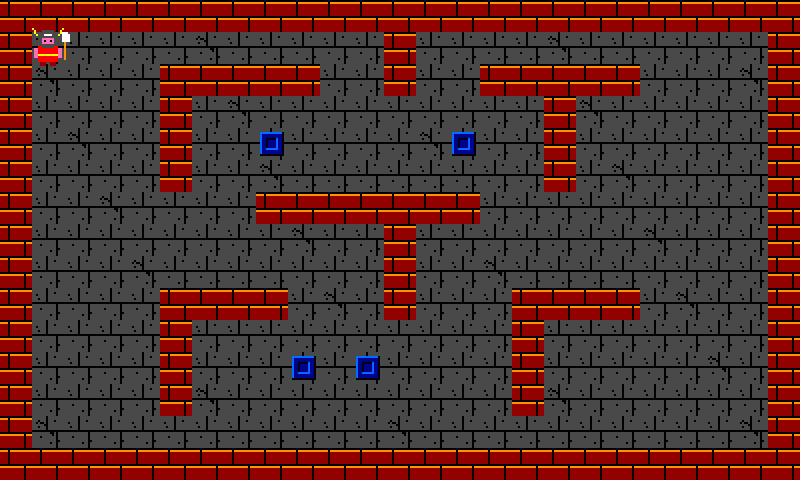
How it works:
Where things are. Sprite positions are in the display's full resolution, 800 x 480, and the visible area starts at
(48, 42). Tiles are 16 pixels wide on the half-resolution screen, so a map cell is 32 units and the 25 x 15 map fills the
screen exactly. A sprite image is 24 x 21 pixels, so 48 x 42 units. Because every box is centred in its image, the sprite
position that centres a sprite on the cell (column, row) is (40+column*32, 36+row*32). The warrior starts in cell (1, 1): position (72, 68).
Reading layer 0. loadLevel("HUNT.LAY",&lay,379) reads the whole file into lay, whose first 4 bytes are the header: the cell
(column, row) is at lay[4+row*25+column]. solidAt turns a screen point into a cell and returns bit 0, the solid layer.
blocked asks whether the four corners of the warrior's 24 x 24 box would land in a solid cell. That box is the collision box of the
image (6,5 to 17,16, doubled: 12..35 by 10..33 units from the sprite's corner).
One axis at a time. moveHero tries to move in x, then in y, each on its own. So walking diagonally against a wall slides along it,
instead of stopping dead. The pad is read from _padLft bit by bit.
The frame. setup() fills the screen with an empty text layer, turns on text, tiles and sprites (0x2F00), loads the palettes into
their registers (0x1170 tiles, 0x11D0 sprites A), the tiles and sprites into the memory the hardware reads, and copies the map into the
tile buffer (areaCpy from &level+4, skipping the header, into 0x2B00, the buffer the screen shows). The loop reads the pad,
moves, waits for the frame (vSync) and then makes the sprites visible (sprUpdt).
Things to try: change the speed 3 to 5 (a wall is 32 units thick, so even 10 units a frame cannot jump over one); set
a breakpoint (F9) on hx+=dx; and watch hx in the Watch panel.
5.5. Step 5: chests, apples and health
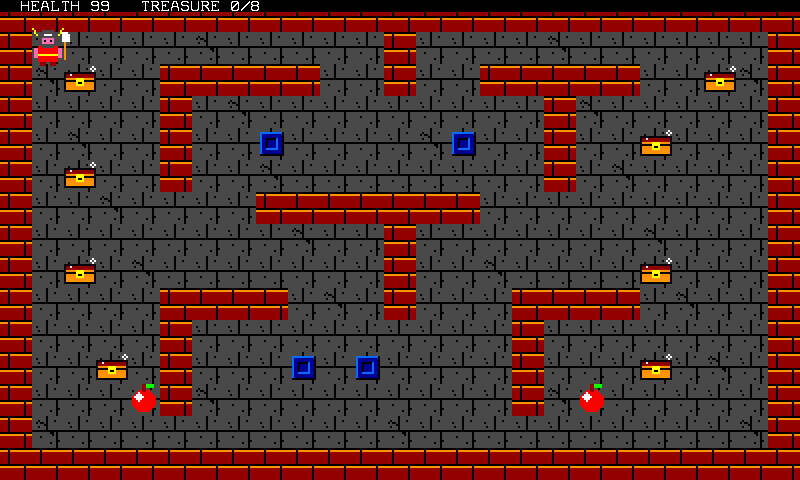
The map says where the objects lie, so the program does not hard-code them: it scans layers 1 and 3. Here are the globals that
are new, then the functions (the whole program is HUNT2.SRC):
byte level[379];                 // HUNT.LVL: 4 header bytes, then 25x15 tile numbers
byte lay[379];                   // HUNT.LAY: the same shape, one bit a layer: 0 solid, 1 treasure, 3 food
int hx;                          // the warrior's sprite position, in 800x480 pixels
int hy;
bool faceLeft;
byte frame;
byte state;                      // 1 playing, 2 won, 3 dead
int health;                      // drains by 1 a second, 99 at most
nat lastSec;
int treasure;                    // chests opened so far
int tx[8];                       // the 8 chests: sprites 15 to 22
int ty[8];
bool ton[8];
int foodX[2];                    // the 2 apples: sprites 23 and 24
int foodY[2];
bool foodOn[2];
// the layers say where things lie: layer 1 for the chests, layer 3 for the apples
void placeItems() {
    int t=0;
    int f=0;
    for(int i=0;i<375;i++) {
        int x=40+(i%25)*32;                            // the sprite position that centres a sprite on the cell
        int y=36+(i/25)*32;
        if((lay[4+i]&2)!=0&&t<8) {
            tx[t]=x;
            ty[t]=y;
            ton[t]=true;
            sprPos((byte)(15+t),x,y);
            t++;
        }
        if((lay[4+i]&8)!=0&&f<2) {
            foodX[f]=x;
            foodY[f]=y;
            foodOn[f]=true;
            sprPos((byte)(23+f),x,y);
            f++;
        }
    }
}

// the warrior against every chest and apple still there
void pickItems() {
    for(int i=0;i<8;i++) {
        if(ton[i]&&isSprSpr(0,(byte)(15+i))) {
            ton[i]=false;
            sprPos((byte)(15+i),0,0);                  // gone
            treasure++;
            showStatus();
            if(treasure==8) {
                state=2;
                banner("YOU WIN!  ENTER: PLAY AGAIN");
            }
        }
    }
    for(int i=0;i<2;i++) {
        if(foodOn[i]&&isSprSpr(0,(byte)(23+i))) {
            foodOn[i]=false;
            sprPos((byte)(23+i),0,0);
            health+=30;
            if(health>99) health=99;
            showStatus();
        }
    }
}

// the dungeon drains one point of health a second
void hunger() {
    if(_time!=lastSec) {
        lastSec=_time;
        health--;
        showStatus();
        if(health<=0) {
            state=3;
            banner("YOU DIED  ENTER: PLAY AGAIN");
        }
    }
}
- Layers drive the objects.
placeItemswalks the 375 cells; a cell with bit 1 (value 2) gets a chest sprite (15 to 22), a cell with bit 3 (value 8) an apple (23 and 24). Move acin the map editor, save, run: the chest has moved, with no change to the code. - Collisions between sprites.
isSprSpr(0,id)is true when the collision boxes of sprite 0 and spriteidoverlap. It uses the positions the hardware currently shows, not the ones you just set withsprPos. - Time.
_timecounts seconds; when it changes, one second has passed:hungertakes a point of health. - A trap worth knowing. A hidden sprite sits at (0,0), and hidden sprites overlap one another. Right after a game starts, before the
first
sprUpdt, the warrior and every chest are still at (0,0) and would all "touch": the chests would all be picked up in the first frame.startGameends with its ownsprUpdt()for that reason. (The same bug would also make the ghosts hurt the warrior at once in step 6.)
The text is drawn by the system's text layer on top of everything:
void showStatus() {
    memSet(0x1200,80,' ');
    curPos(2,0);
    print("HEALTH ",health,"   TREASURE ",treasure,"/8  ");
    memSet(0x1E80,80,0x12);                        // print paints black on nothing: white on black
}

// a black band with a message on the middle row
void banner(text msg) {
    nat a=0x1200+18*80+20;
    memSet(a,40,' ');
    curPos(24,18);
    print(msg);
    memSet(a+0x0C80,40,0x1B);                      // the colours sit 0xC80 after the glyphs: yellow on black
}
print paints the cells it writes black on nothing, so after printing the program repaints the colour bytes (the colour buffer lies
0xC80 bytes after the glyphs: 0x1E80). 0x12 is white on black, 0x1B yellow on black. The state variable (1 playing, 2 won, 3 dead) decides what the loop does:
setup();
startGame();
while(_keyDwn!=12) {                             // until ESC
    if(state==1) {
        moveHero();
        pickItems();
        hunger();
    } else if((_padLft&0b00000100)!=0) {         // Start (Enter)
        startGame();
    }
    glint();
    vSync();
    sprUpdt();
    frame++;
}
At the end of a game the loop only waits for Start (Enter) to call startGame() again. Run it: collect the 8 chests (the banner says YOU WIN),
or stand still for 99 seconds (YOU DIED).
5.6. Step 6: axes, ghosts and generators

Three new kinds of moving things, all of them sprites: the axes (sprites 1 to 4), the ghosts (5 to 12) and the generators (13 and 14). The sprite budget is the machine's 32, and it is worth writing down who owns which numbers before coding: the header comment of the globals does exactly that.
byte level[379];                 // HUNT.LVL: 4 header bytes, then 25x15 tile numbers
byte lay[379];                   // HUNT.LAY: the same shape, one bit a layer: 0 solid, 1 treasure, 2 generator, 3 food
int hx;                          // the warrior's sprite position, in 800x480 pixels
int hy;
int fdx;                         // where he faces, and where an axe flies: -1, 0 or 1 on each axis
int fdy;
bool faceLeft;
byte frame;
byte state;                      // 1 playing, 2 won, 3 dead
int health;                      // drains by 1 a second, 99 at most
nat lastSec;
int treasure;                    // chests opened so far
int score;
int tx[8];                       // the 8 chests: sprites 15 to 22
int ty[8];
bool ton[8];
int foodX[2];                    // the 2 apples: sprites 23 and 24
int foodY[2];
bool foodOn[2];
int fire;                        // frames before the next axe can be thrown
int ax[4];                       // the 4 axes in flight: sprites 1 to 4
int ay[4];
int adx[4];
int ady[4];
bool aon[4];
int gx[8];                       // the 8 ghosts: sprites 5 to 12
int gy[8];
bool gon[8];
int genX[2];                     // the 2 generators: sprites 13 and 14
int genY[2];
int genHp[2];                    // 3 axes destroy one
int genWait[2];                  // frames before the next ghost
Throwing. The axe flies where the warrior last walked (fdx, fdy, set in moveHero, so diagonals work), 7 units a frame, at most 4 at a time, one every 12 frames:
// button A (the Z key) throws an axe, one every 12 frames, 4 in the air at most
void throwAxe() {
    if(fire>0) {
        fire--;
        return;
    }
    if((_padLft&0b00000001)==0) return;
    for(int i=0;i<4;i++) {
        if(!aon[i]) {
            aon[i]=true;
            ax[i]=hx;
            ay[i]=hy;
            adx[i]=fdx*7;
            ady[i]=fdy*7;
            fire=12;
            return;
        }
    }
}

void killAxe(int i) {
    aon[i]=false;
    sprPos((byte)(1+i),0,0);
}

// axes fly straight, kill a ghost, wear a generator down, and break on a wall (the hits are tested first: a generator
// can stand right against a wall)
void moveAxes() {
    for(int i=0;i<4;i++) {
        if(aon[i]) {
            ax[i]+=adx[i];
            ay[i]+=ady[i];
            sprRef((byte)(1+i),(byte)(2+((frame>>1)&1)));
            sprPos((byte)(1+i),ax[i],ay[i]);
            for(int g=0;g<8;g++) {
                if(aon[i]&&gon[g]&&isSprSpr((byte)(1+i),(byte)(5+g))) {
                    gon[g]=false;
                    sprPos((byte)(5+g),0,0);
                    killAxe(i);
                    score+=10;
                    showStatus();
                }
            }
            for(int g=0;g<2;g++) {
                if(aon[i]&&genHp[g]>0&&isSprSpr((byte)(1+i),(byte)(13+g))) {
                    genHp[g]--;
                    killAxe(i);
                    if(genHp[g]==0) {
                        sprPos((byte)(13+g),0,0);
                        score+=100;
                        showStatus();
                    }
                }
            }
            if(aon[i]&&solidAt(ax[i]-48+24,ay[i]-42+21)) killAxe(i);
        }
    }
}
Read moveAxes in order: move, show, test against the ghosts, test against the generators, then the wall. That last order matters: a generator can stand against a wall,
and an axe that is tested against the wall first dies before it ever touches the generator (this really happened while the game was written: the left generator is against the wall, and the automated test that shoots at it found the bug).
The enemies. Every generator that still stands (genHp>0) sends a ghost every 100 frames while a slot is free; a ghost walks toward the warrior, one axis at a time, and slides along walls:
// a generator that still stands sends a ghost every 100 frames, if there is room for one
void spawn() {
    for(int g=0;g<2;g++) {
        if(genHp[g]>0) {
            genWait[g]--;
            if(genWait[g]<=0) {
                genWait[g]=100;
                for(int i=0;i<8;i++) {
                    if(!gon[i]) {
                        gon[i]=true;
                        gx[i]=genX[g];
                        gy[i]=genY[g];
                        break;
                    }
                }
            }
        }
    }
}

// a ghost walks to the warrior, slides along the walls, and costs him 10 health when it touches him
void moveGhosts() {
    for(int i=0;i<8;i++) {
        if(gon[i]) {
            int dx=0;
            int dy=0;
            if(hx-gx[i]>2) dx=2;
            if(hx-gx[i]<-2) dx=-2;
            if(hy-gy[i]>2) dy=2;
            if(hy-gy[i]<-2) dy=-2;
            if(dx!=0&&!blocked(gx[i]+dx,gy[i])) gx[i]+=dx;
            if(dy!=0&&!blocked(gx[i],gy[i]+dy)) gy[i]+=dy;
            sprRef((byte)(5+i),(byte)(4+((frame>>3)&1)));
            sprPos((byte)(5+i),gx[i],gy[i]);
            if(isSprSpr(0,(byte)(5+i))) {
                gon[i]=false;
                sprPos((byte)(5+i),0,0);
                health-=10;
                checkDeath();
            }
        }
    }
}
A ghost that touches the warrior (isSprSpr(0, ghost)) costs him 10 health and is gone. The score goes up by 10 for a ghost,
100 for a generator, 50 for a chest, and showStatus now shows it. Death moved into one function, checkDeath, because hunger and ghosts can both cause it.
The main loop calls the new steps in this order:
setup();
startGame();
while(_keyDwn!=12) {                             // until ESC
    if(state==1) {
        moveHero();
        throwAxe();
        moveAxes();
        spawn();
        moveGhosts();
        if(state==1) pickItems();
        if(state==1) hunger();
    } else if((_padLft&0b00000100)!=0) {         // Start (Enter)
        startGame();
    }
    glint();
    vSync();
    sprUpdt();
    frame++;
}
Try: stand in front of a generator and hold Z; walk away from a ghost (it moves 2 units a frame, you move 3); eat an apple when health is low. Open the Hardware panel while the game runs: the sprites table lists the 32 sprites, their images, positions and priorities, live.
5.7. Step 7: title screen, music and sound
The game plays; it needs a face and a voice.
The title screen. File > New Asset > New Screen design opens the screen designer: an 80 x 40 text screen where each cell has a glyph (one of the
256 of the machine's font) and a paper and ink colour. Pick a glyph in the palette, a colour in the bar, and use paint, box, fill, or the write tool (click, then type).
The title is built from # characters, orange DUNGEON over red HUNT, with the instructions in white and cyan; the finished one is HUNT.SCR.
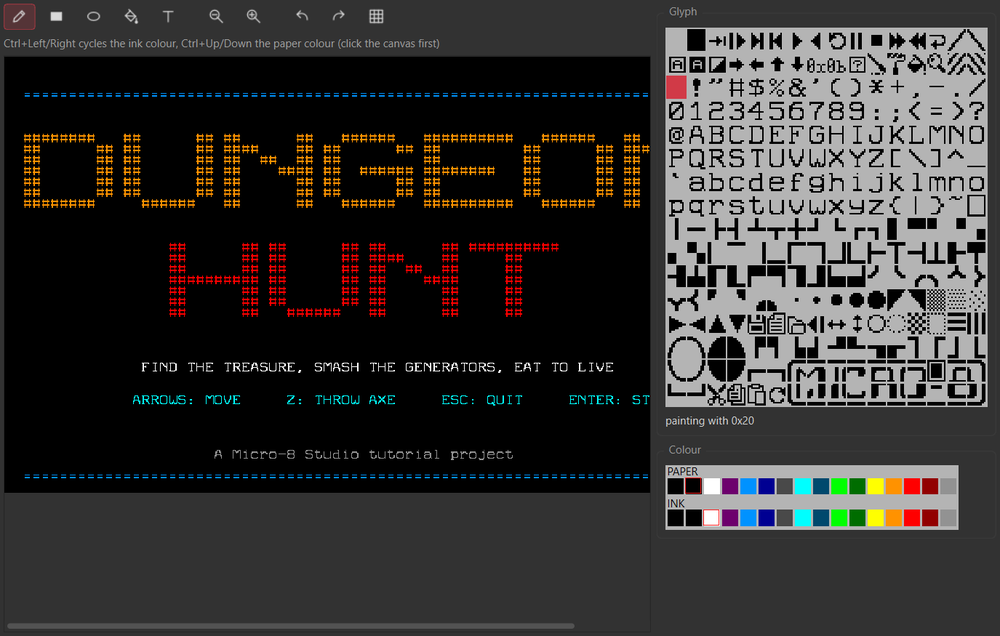
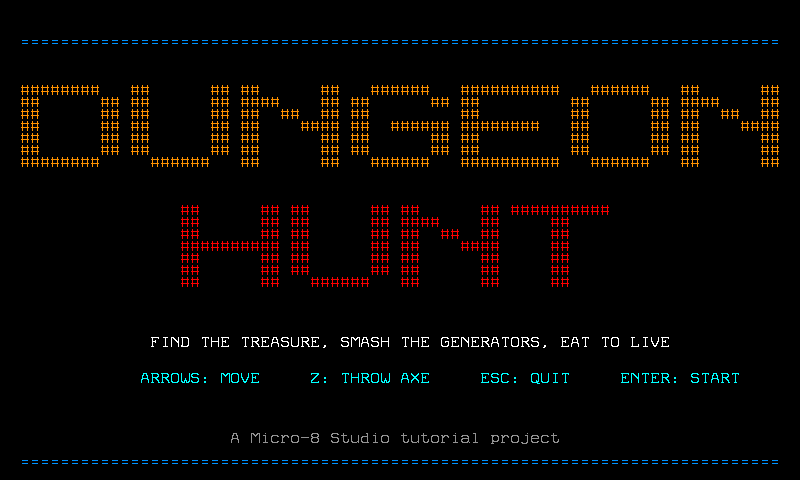
A .SCR is 6400 bytes: the 3200 glyphs then the 3200 colours, exactly as the machine keeps its text screen in memory (0x1200 and 0x1E80), plus a 2-byte checksum.
The music. File > New Asset > New Tracker project opens the tracker: a grid of 16 steps by 8 tracks (six FM voices, a drum track, a synth track). Each cell holds a note,
an instrument and a velocity. DUNGEON HUNT's tune is four patterns of 16 steps in A minor, 108 beats per minute, played in a loop (SONG band at the bottom: four cards, one per pattern):
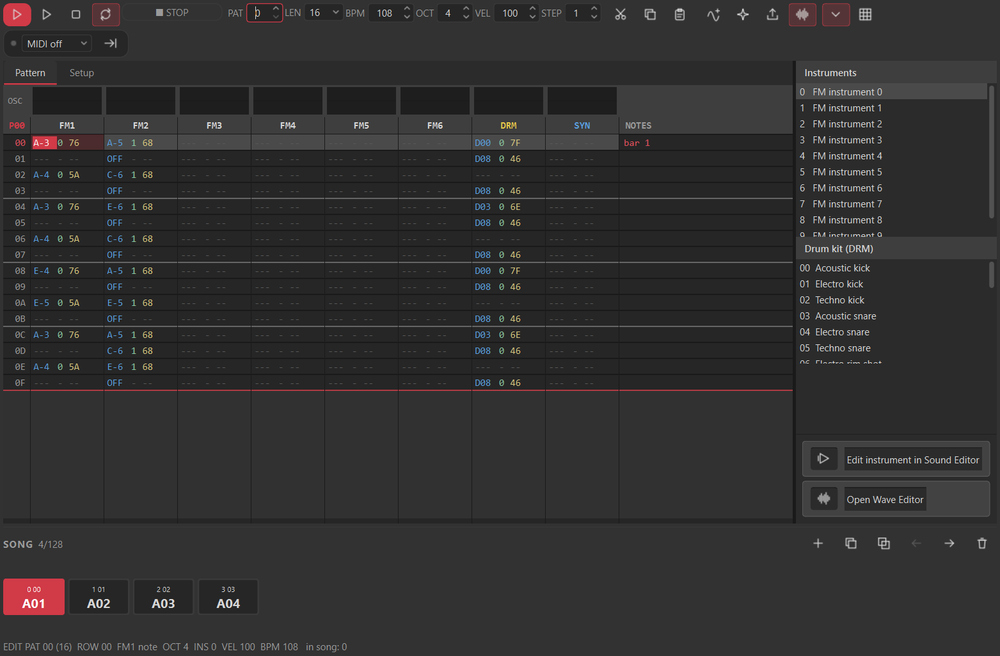
- FM1, the bass. Right-click the instrument slot 0 and choose Load .INS into slot 0...:
TOOLS\SOUNDED\SOUNDS\BASS01.INS. One note on every beat (steps 0, 4, 8, 12), as root, root, fifth, root of the chord, and the octave above of that note two steps later. The chords are Am, F, G and E, so pattern 1 is A-3 A-3 E-4 A-3, pattern 2 F-3 F-3 C-4 F-3, pattern 3 G-3 G-3 D-4 G-3, pattern 4 E-3 E-3 B-3 E-3 (the tracker counts octaves one higher than the usual MIDI names: its A-3 is the A of 110 Hz). - FM2, the lead. Slot 1 gets
LEAD02.INS. Each pattern is an arpeggio of the chord, then a turn: pattern 1A-5 C-6 E-6 C-6 A-5 E-5 A-5 C-6 E-6, pattern 2F-5 A-5 C-6 A-5 F-5 C-5 F-5 A-5 C-6, pattern 3G-5 B-5 D-6 B-5 G-5 D-5 G-5 B-5 D-6 B-5, pattern 4E-5 G#5 B-5 G#5 E-6 D-6 B-5 G#5. The notes sit on steps 0, 2, 4... with a few on the odd steps at the end of the bar; anOFFcell ends a note. - DRM, the drums. The digital synth's DPCM kit: a kick (entry 0) on steps 0 and 8, a snare (entry 3) on steps 4 and 12, a closed hat (entry 8) on every odd step.
- Play with Space, then save as
HUNT.M8S.
You can enter notes with the computer keyboard (the Z S X D C V... row is the white and black keys of one octave, Q 2 W 3 E R... the octave above) or by clicking a cell; the Generate button of the toolbar writes a bass, a drum or an arpeggio pattern for you. The tracker is described in section 9.6. Leave FM6 (the sixth FM track) empty: the game uses that voice for sound effects, and the music must not step on it.
Playing it from the program. Insert the library again and tick screen and song: loadScreen shows the .SCR; songLoad, songStart and songTick play the .M8S:
the tracker's own player, written in Lofi, which reads the song's events and drives the same voices as the tracker. Call songTick() once a frame.
Sound effects. A short sound on a voice the music does not use:
// a short sound on FM voice 6, the one the song leaves alone
void sfx(byte note) {
    ymVoice(5,1,5,3,110);
    ymNoteOn(5,note,127);
}

// the title picture drawn in the Screen designer
void title() {
    poke(0x2F00,0b00010000);                       // the text layer alone
    loadScreen("HUNT.SCR");
    state=0;
}
and calls to it where things happen: throwing an axe (note 72), killing a ghost (60), destroying a generator (48), being hit (40), a chest (88), an apple (80), winning (96), dying (33).
Notes are MIDI numbers. title() shows only the text layer; startGame() turns tiles and sprites on. The finished main loop, HUNT.SRC, has three more parts:
the song, the title, and a clean exit.
setup();
if(songLoad("HUNT")) songStart();                // the music of HUNT.M8S, played by M8LIB's player
title();
while(_keyDwn!=12) {                             // until ESC
    songTick();
    if(state==1) {
        moveHero();
        throwAxe();
        moveAxes();
        spawn();
        moveGhosts();
        if(state==1) pickItems();
        if(state==1) hunger();
    } else if((_padLft&0b00000100)!=0) {         // Start (Enter): the title or an end screen leads to a new game
        startGame();
    }
    if(state!=0) glint();
    vSync();
    sprUpdt();
    frame++;
}
songStop();                                      // leave the machine as it was found
ymNoteOff(5);
poke(0x2F00,0b00010001);
memSet(0x1200,3200,' ');
memSet(0x1E80,3200,0x12);
curPos(0,0);
Run the whole game with F5. The music starts on the title screen and goes on while you play. Esc stops everything, silences the voices, and gives the screen back as it was found.

5.8. Step 8: debug and measure
Studio runs the program on an emulator of the machine, so you can stop it and look inside.
- Breakpoint. Click in the gutter next to
health-=10;inmoveGhosts(or F9). Run, let a ghost touch the warrior: the program stops on that line, highlighted. - Variables and Watch. The Variables panel lists the call stack, the locals (
i,dx,dy) and the globals (health,score,state,treasure); changed values show in orange. Add an expression to Watch, for instancegx[0]-hx, to see the first ghost's distance. - Step. F10 steps over, F11 into, Shift+F11 out; F5 goes on. Right-click a breakpoint to give it a condition, such as
i==2. - Memory breakpoint.
Run > Add Memory Breakpoint..., or right-click a byte in the Memory panel: the program stops when that byte changes, whoever wrote it. Try address0x2F00, the layer register, and start a game: it stops wherestartGamewrites it. - Hardware panel. Layers, scroll, palettes and the 32 sprites, live. Compare the sprite table with the map: sprite 13 sits at the cell of the left generator.
- Memory Map. The program is compiled to bytecode, and the machine gives it 32 KB of code and 16 KB of data. For DUNGEON HUNT the estimate is about 8.5 KB of code and 2 KB of data: a quarter of the budget, with the library, the player and the sound effects. The estimate comes from a model fitted on the card's own compiled programs (within 5%).
- Speed. By default the emulator runs as fast as the PC.
Run > Hardware Speed (X1)runs at the real machine's speed: every VM operation costs a fixed time, so a program does as much work per frame as on the console. If the game slows down in X1, a frame has too much to do (here: up to eight ghosts chasing, four axes tested against ten targets); that is the thing to check before sending a game to a real machine. - Overlays.
View > Overlays(and F7, which shows or hides them all) draws over the screen what the program cannot show about itself, running or paused: the sprite boxes, red while they touch another sprite, the sprites parked at 0,0, the tile grid, the collision layers ofHUNT.LAY, and under the pointer the pixel, the tile, the sprite and its layers. In a fight, the box of a generator turns red when an axe reaches it: that is the testisSprSprmakes (section 7.2).

5.9. Step 9: check, export, and run on the machine
File > Project > Check Project. It reports what the real machine would refuse: names that are not 8.3, compile errors, code over 32 KB, project files that are missing, and the files your strings name that are not in the folder. A clean project says so.File > Project > Export Project to SD Card...copies the manifest, the program and every asset intoFOLDER\on a card (it asks before replacing). If the machine is connected by MIDI, Send Project to Machine... does the same without taking the card out (section 9.10).- On the machine. Put the folder on the card, switch the console on, and at the prompt:
cd HUNT
compile HUNT.SRC
run HUNT.BIN
cd changes to the folder (the program opens its files from there), compile turns the source into bytecode and reports the code and data sizes, and run starts it. The game
loads HUNT.SPR, HUNT.LVL, HUNT.LAY, HUNT.SCR and HUNT.M8S from the current folder.
5.10. Where to go from here
- More levels. Make
LEVEL2.LVLandLEVEL2.LAYin the map editor, and load them when the last chest is gone. The program does not change except for two file names. - A bigger dungeon. Make the map 80 x 24 and scroll it with the hardware registers
0x2F01and0x2F02(theTILESdemo shows how). - Doors and keys. Layer 4 marks doors; a key flag lets the warrior through; the wall test checks it.
- Faster ghosts, better ghosts. A ghost type with 2 hit points; ghosts that cannot see you if a wall is between.
- Two players. The right pad register is
_padRght. - A real tune. Open the tracker's generators, or play your instruments from the sound editor into the wave editor and build your own sounds (section 9.5).
You now know the whole path: assets with the editors, a program that loads them, layers that say where things are, a project that holds them, and a test on the machine.